
How to Download Your HMRC Income Documents
A step-by-step guide to getting your SA302, Tax Year Overview and SA100 from HMRC online
If you are self-employed, a company director, or a landlord with rental income, your mortgage lender will almost certainly ask for HMRC income documents as part of your application. This page walks you through exactly how to download each one.
The three documents lenders most commonly ask for are your Tax Calculation (SA302), your Tax Year Overview, and sometimes your full Tax Return (SA100). Most lenders ask for the last two years of each. Your accountant may be able to provide these, but if you need to download them yourself this guide covers everything you need to know.
If you are not sure which documents your application requires, take a look at our Self Employed Mortgages page or get in touch and we will tell you exactly what to gather before we start.
WHAT IS A TAX CALCULATION (SA302)?
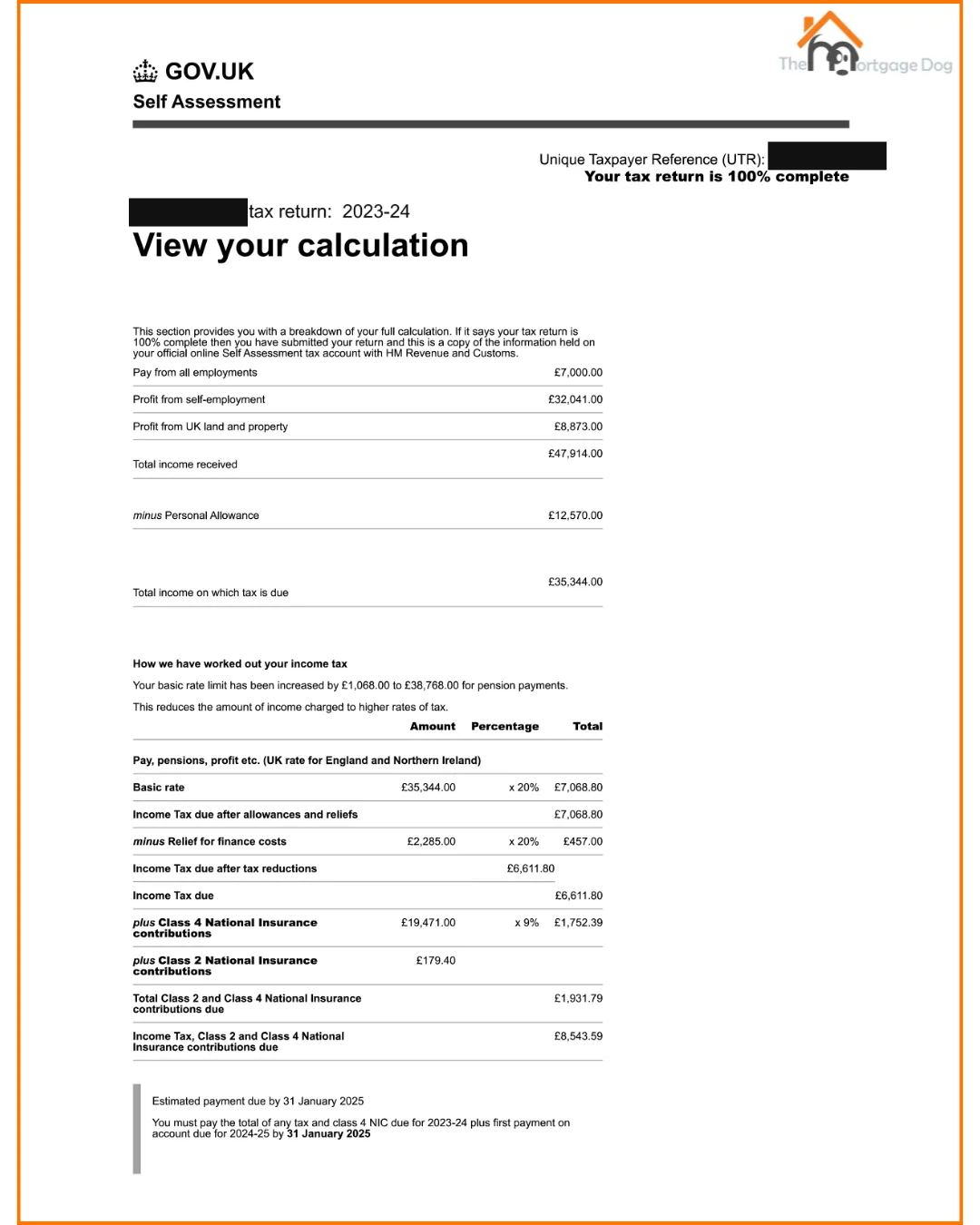
Your tax calculation, officially known as an SA302, is a one-page summary of your income for a given tax year ending 5 April. It shows your income from all sources, including self-employment, salary, dividends, land and property earnings, pension income, savings, and investments.
It is the document most mortgage lenders use to verify your income if you are self-employed or have income from multiple sources. Most lenders ask for the last two years, though some ask for three.
How to Download Your SA302
Click Sign In and enter your Government Gateway login details
Select Self Assessment (if you are only registered for Self Assessment you may be redirected here automatically)
Click the link that reads More details about your Self Assessment returns and payments
Under previously filed returns for the latest year, select Get your SA302 tax calculation
Click Continue to your SA302
At the bottom of the page click Print your full calculation
Select Save as PDF and save the document
For previous years:
Go back to the account home page
Click More details about your Self Assessment returns and payments
Click View more previous years Self Assessment
Under the year you need, select Get your SA302 tax calculation
Click Continue to your SA302
Click Print your full calculation
Select Save as PDF and save
Repeat for each year your lender requires.
Self Assessment (SA302) Example:
WHAT IS A TAX YEAR OVERVIEW?
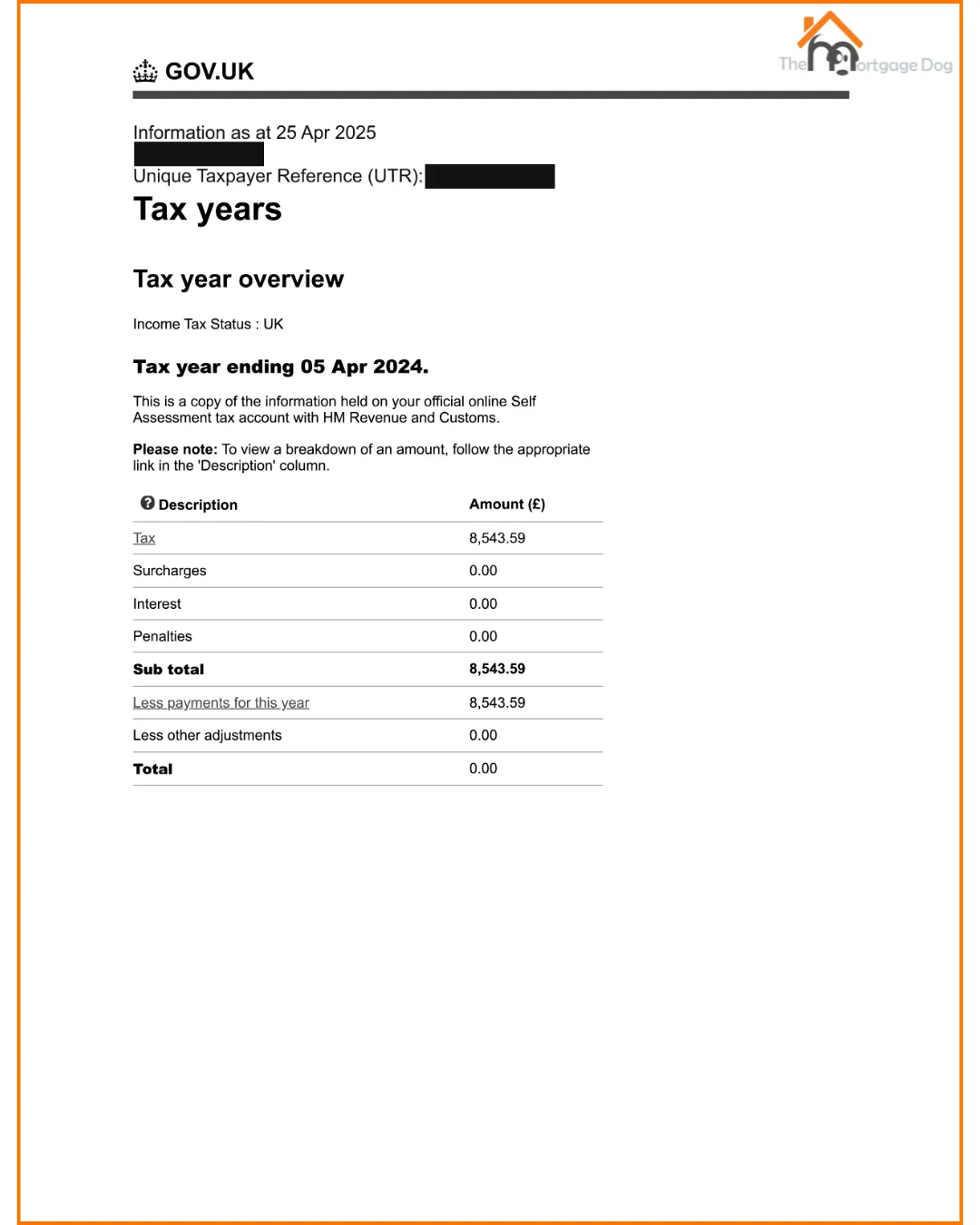
Your Tax Year Overview shows the total tax you paid in a given year and should match up with your SA302 for the same year.
Lenders ask for this alongside your SA302 as a cross-reference to confirm the figures are consistent.
Most lenders require a Tax Year Overview for each year they have asked for an SA302.
How to Download Your Tax Year Overview
Click Sign In and enter your Government Gateway login details
Select Self Assessment
Click More details about your Self Assessment returns and payments
Click View your tax year overview
Select the tax year you need from the dropdown and click Go
Click Print your tax year overview
Select Save as PDF and save the document
For previous years:
Go back and select the tax year from the dropdown
Click Go
Click Print your tax year overview
Select Save as PDF and save
Repeat for each year your lender requires.
Tax Year Overview Example:
WHAT IS A TAX RETURN (SA100)?
Your full Tax Return, known as an SA100, contains the complete detail of your tax for a given year. Unlike the SA302 which is a summary, the SA100 includes capital gains, student loan repayments, interest, pensions, charitable giving, and any claims for reliefs and allowances.
Not all lenders ask for the SA100 but some do, particularly for more complex income situations or larger loan amounts. We will tell you upfront whether your application requires it.
How to Download Your SA100
Click Sign In and enter your Government Gateway login details
Select Self Assessment
Click View and manage your self-assessment tax return
Under previously filed returns, click on the latest year
Under tax year summary, select the tax year and click Go
A list of filed returns will appear — click View return
Scroll down and click View / Print / Store your return onto your local drive
Scroll to the colour copy option and click View PDF
Download and save the document, or select Print and Save as PDF
For previous years:
Go back to the tax year summary section
Select the year you need and click Go
Click View return
Scroll down to View / Print / Store your return onto your local drive
Click View PDF under the colour copy option
Download or save as PDF
Repeat for all years required.
HOW MANY YEARS DO I NEED?
Most lenders ask for the last two full tax years. Some ask for three, particularly for larger loans or more complex income structures. The tax year runs from 6 April to 5 April, so the most recent complete tax year is 2024/25 (ending 5 April 2025).
If your most recent tax year has only recently ended and your return has not yet been filed, some lenders will accept the two years prior to the latest. We will advise you on exactly which years to download based on the lenders most suited to your circumstances.
WHAT IF MY ACCOUNTANT FILES MY RETURNS?
Your accountant will be able to download these documents on your behalf if they have agent access to your HMRC account. They may also have their own Tax Computations which some lenders accept as an alternative to the HMRC SA302, usually accompanied by a Tax Year Overview.
If your accountant provides Tax Computations rather than SA302s, let us know and we will confirm which lenders will accept them for your application.
WHAT IF I CANNOT ACCESS MY HMRC ONLINE ACCOUNT?
If you have lost your Government Gateway login details you can recover them at www.gov.uk/log-in-register-hmrc-online-services using your National Insurance number and either your passport or UK driving licence to verify your identity.
If you are having persistent difficulty accessing your account, HMRC can post paper copies of your SA302 to you though this typically takes around two weeks. Call HMRC on 0300 200 3310 to request them.
SENDING YOUR DOCUMENTS TO US
Once you have downloaded your documents, you can send them to us by email at [email protected] or share them securely via our online portal. Speak to us about how to set this up.
We treat all client documents with complete confidentiality. We never share your financial information with any third party other than the lender or lenders we are applying to on your behalf.
Frequently Asked Questions
Do I need HMRC documents if I am employed and have a salary?
If you are a standard PAYE employee your lender will usually accept payslips and a P60 rather than HMRC documents. SA302s and Tax Year Overviews are primarily needed for self-employed applicants, company directors, and those with additional income from property or investments.
My SA302 shows a lower income than I actually earn — why?
This is a common issue for limited company directors who pay themselves a combination of salary and dividends. Your SA302 reflects the income you have declared to HMRC and some directors take a minimal salary for tax efficiency reasons. Lenders assess directors' income differently and some will consider salary plus dividends while others look at salary plus net profit. We will identify which approach and which lenders work best for your specific income structure.
Can I use my accountant's reference instead of HMRC documents?
Some lenders will accept accountant-certified Tax Computations alongside Tax Year Overviews as an alternative to HMRC SA302s. This is more common with specialist lenders. We will confirm what each lender requires before your application is submitted.
What if my income has gone up significantly in the last year?
Some lenders will average your income across the two or three years provided. Others will use the most recent year only. If your income has increased significantly, we will identify lenders who use the most recent year as this will maximise your borrowing potential. If your income has dropped, we will find lenders who average or use the best year for your circumstances.
What if I have only been self-employed for one year?
Most lenders require a minimum of two years of trading history. Some specialist lenders will consider one year of accounts or SA302s in the right circumstances. We work with lenders who are experienced with recently self-employed applicants and will assess your options honestly.
NEED HELP WITH YOUR MORTGAGE?
If you are self-employed, a company director, or a landlord and you are thinking about a mortgage, The Mortgage Dog can help. We are a whole-of-market broker based in Washington, Tyne and Wear, and we have experience with complex income structures, self-employed applicants, and the kind of cases that high street banks struggle with.
Get in touch today for a free, no-obligation chat.
YOUR HOME MAY BE REPOSSESSED IF YOU DO NOT KEEP UP REPAYMENTS ON YOUR MORTGAGE.
There may be a fee for arranging a mortgage and the precise amount will depend on your circumstances. This will typically be between £199-£699.
The Mortgage Dog is a trading style of The Mortgage Dog Ltd which is an Appointed Representative of Stonebridge Mortgage Solutions Ltd, which is authorised and regulated by the Financial Conduct Authority.
The Mortgage Dog Ltd (FCA Number 788976) -by clicking this link are now leaving Themortgagedog.com. We are not responsible for the content or privacy practices of external websites.
The Mortgage Dog Ltd. is registered in England and Wales under company number 12306191 at the registered address 41a Spout Lane, Washington, NE38 7HP. Not all Buy to Let Mortgages are regulated by The Financial Conduct Authority
To view our Privacy Policy & Cookie Policy click here